New pricing tier launch
Verify list prices, upgrade paths, and invoice wording match the approved commercial brief.
Approve with confidence
Acceptance testing-often user acceptance testing (UAT)-confirms the product meets business needs before go-live. Stakeholders validate journeys in language they understand, not in test code.
Quick answer
Acceptance testing evaluates whether a system satisfies agreed criteria from a business or customer perspective.
On web projects, UAT usually involves product owners, customer success, or client representatives executing scripted scenarios in a staging environment. Success means workflows match contracts, policies, and user expectations, not merely that developers' unit tests pass.
Acceptance can be manual at first. Teams automate recurring UAT paths when releases repeat the same sign-off checklist and stakeholders need faster, consistent evidence.
The workflow
Structure UAT so business reviewers know what to validate and what proof to capture.
Translate requirements into observable outcomes-"manager can export CSV" not "API returns 200."
Seed accounts, products, and permissions reviewers will recognize from training materials.
Write steps in plain language so non-technical reviewers can follow and challenge assumptions.
Store screenshots or run reports with each scenario for audit and customer sign-off packets.
Once stakeholders agree on flows, record them for regression-style acceptance on every release.
In practice
Acceptance scenarios business stakeholders commonly sign off.
Verify list prices, upgrade paths, and invoice wording match the approved commercial brief.
Complete welcome steps, invite teammates, and confirm entitlement limits match the sold plan.
Generate the monthly audit export and validate required columns match regulatory templates.
Confirm logo, colors, and email templates match the client's brand guidelines in the live UI.
Best practices
Acceptance testing succeeds when business and QA share the same definition of done.
Early review prevents UAT scripts that test the wrong interpretation of requirements.
Branch scenarios for admin vs user or standard vs enterprise without duplicating entire scripts.
Dedicated staging tenants keep acceptance demos predictable for executives and clients.
Link execution reports to release records for SOX or customer audit requests.
From guide to repeatable system
Acceptance testing works when flows read like the product, not like Java, and stakeholders can review execution proof without opening an IDE.
QAlity for product teams API Testing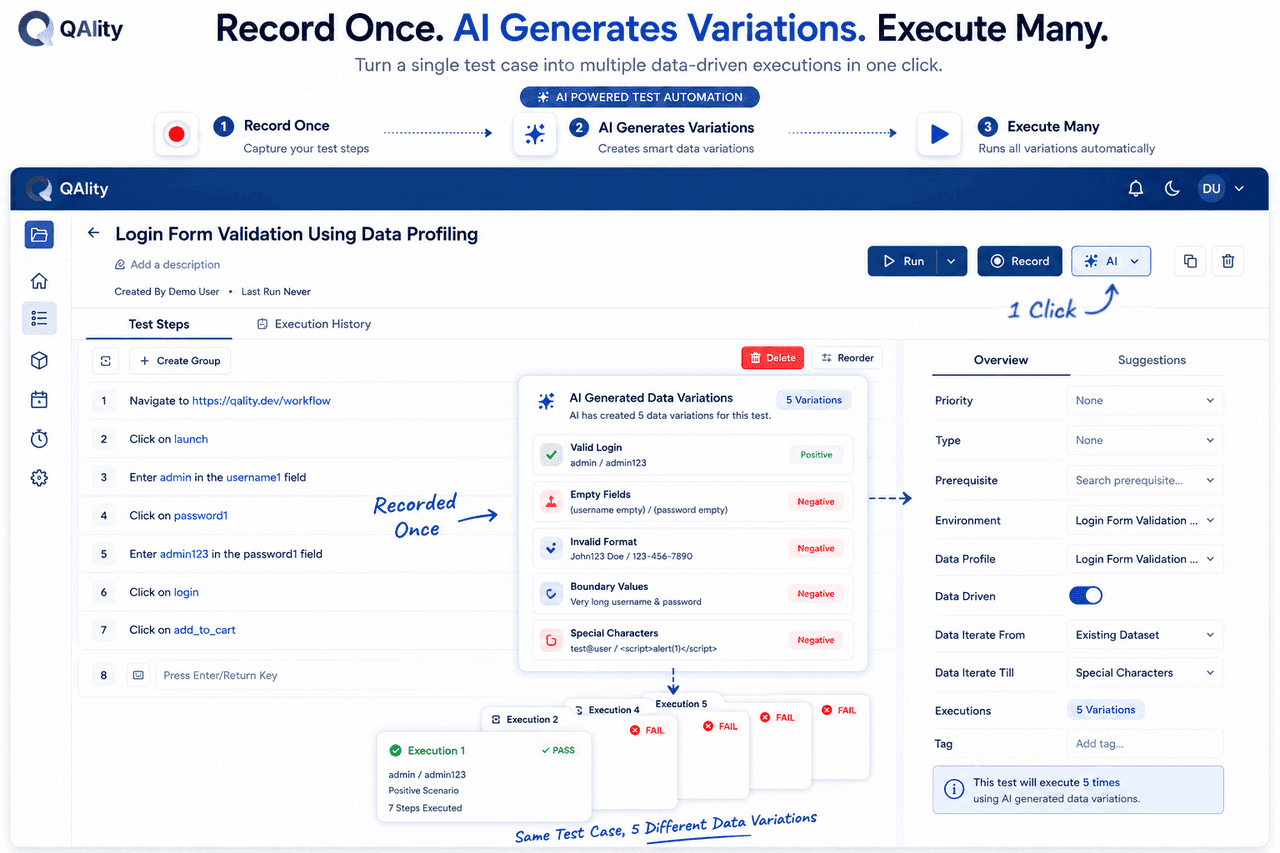
The challenge
UAT scripts are code-only, so business reviewers cannot own or extend them
How QAlity helps
Acceptance flows show plain step names such as "Open billing", "Apply discount", and "Confirm invoice", so product and CS can validate behavior without Selenium training.
Chrome recorderThe challenge
Acceptance scenarios need variants for roles, plans, or regions
How QAlity helps
Branch acceptance cases for admin vs member or trial vs paid without duplicating entire scripts-variations keep UAT readable and maintainable.
Case variationsThe challenge
Sign-off meetings need a clear pass/fail record with evidence
How QAlity helps
Share run history with step outcomes and screenshots so acceptance is backed by artifacts, not anecdotal "I clicked around and it looked fine."
Execution history & reports
 Questions, answered
Quick answers to the most common questions teams have before getting started with QAlity.
Business or product owners define criteria; QA or implementation partners often automate and facilitate runs. QAlity's no-code recorder lets either group author readable flows.
Yes. Case variations let you maintain one base acceptance flow with branches for roles, locales, or plan types-keeping UAT readable without copy-paste duplication.
No. Automated acceptance covers agreed repeatable scenarios. Exploratory review still finds usability surprises automation did not script.
Start with one critical flow
Record stakeholder journeys in plain language and share execution reports before go-live.