Create your account
To get started with QAlity, create your account at app.qality.dev/#/auth/register. Registration takes less than a minute.
How to register
-
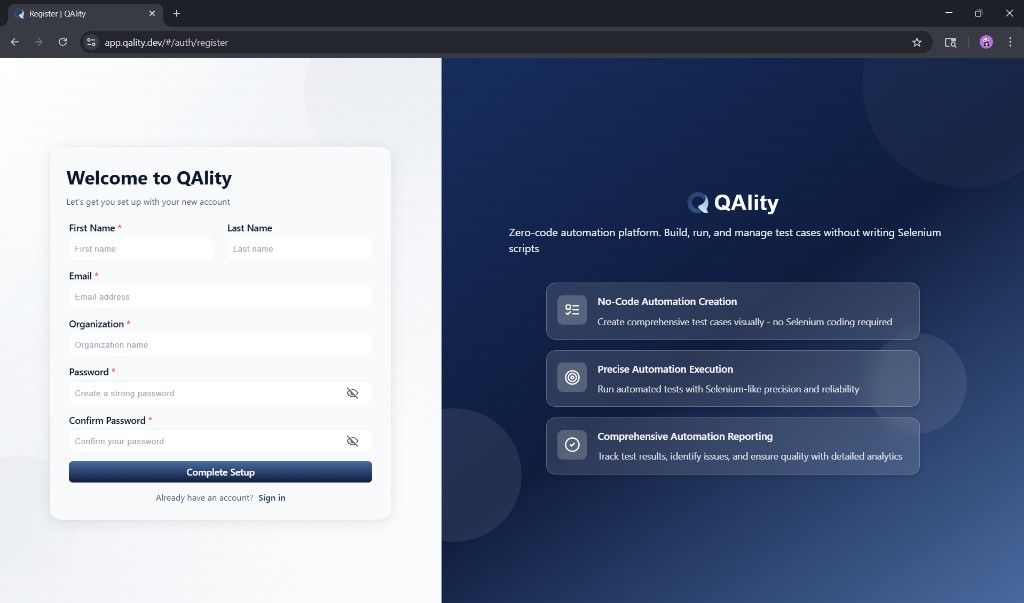
Go to the registration page
Open app.qality.dev/#/auth/register in Chrome.
-
Fill in the registration form
The form has the following required fields:
First Name - Your first name as you want it to appear in QAlity.
Last Name - Your last name.
Email - Use your work email. This is what you will use to sign in every time. It cannot be changed after registration without contacting support.
Organization - Enter your company or team name. This is used to identify your workspace in QAlity. All team members you invite will belong to this organization.
Password - Create a strong password. Use at least 8 characters with a mix of letters and numbers.
Confirm Password - Must exactly match the password you entered above.
-
Click Complete Setup
Click the Complete Setup button. Your account is created instantly and you are taken straight to the QAlity dashboard. No email verification is needed.
What happens next
After registration you will land on the QAlity dashboard where you can:
- Create your first test case
- Start recording by clicking Start recording inside a test case
- Follow the in-app popup to install the Recorder extension and enable Incognito
- Invite your team members from Settings - Users
Your organization workspace is ready to use immediately.
Tips
- Use your work email so your team can find and invite you easily
- Remember your password - there is no way to recover it without the account recovery flow
- If your company already has a QAlity workspace, ask your admin to invite you instead of creating a new organization
Click Sign in at the bottom of the registration form to go to the login page.