Versions
Versions let you organise test cases within a project by release, sprint, or iteration. Each version holds its own independent set of test cases. For example a project might have v1 with 10 test cases and v2 with a different set of 10 test cases. Versions are managed from inside a project on the Versions tab.
Version card
Each version is displayed as a card showing:
| Field | Description |
|---|---|
| Name | The version name - for example v1, v2, sprint-1 |
| Description | An optional note about this version |
| Cases | Number of test cases in this version |
| Suites | Number of test suites linked to this version |
| Plans | Number of test plans linked to this version |
| Updated By / At | Who last edited it and when |
How to create a Version
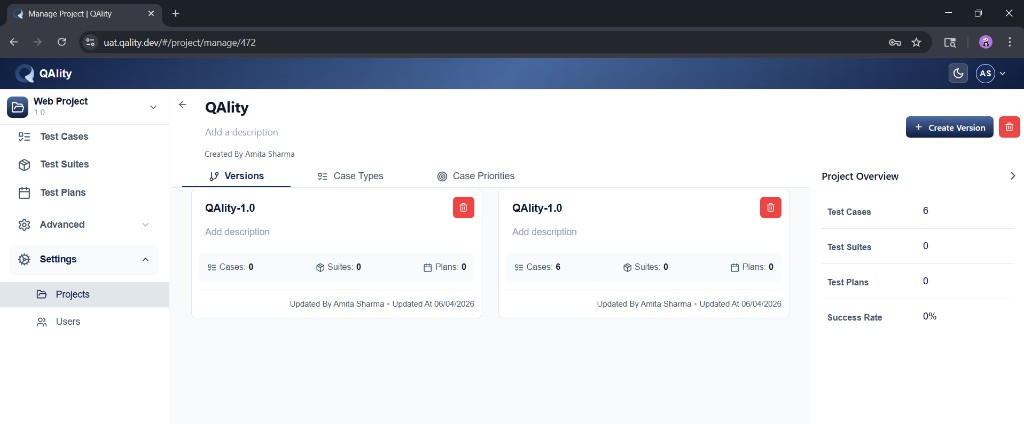
-
Open a project
Open a project from the Projects list.
-
Click the Versions tab
Click the Versions tab.
-
Click + Create Version
Click + Create Version in the top right.
-
Use the default version or create new versions
Each project already has one pre-created version. You can create more versions, and names like
v1andv2can be created automatically.
Best practices
- Use clear version names like
v1,v2,sprint-1,sprint-2, orrelease-2.0 - Add a description to note what changed or what this version covers
- Keep versions focused - one per release or sprint cycle
- Delete versions that are no longer relevant to keep the list clean