Mass failures after a single PR
Dozens of tests red on a CSS or component rename.
Blast radiusUI resilience field guide
A redesign should not mean a week of locator triage. This guide explains why UI changes break suites and how QAlity Auto-Heal and visual re-recording keep browser tests passing.
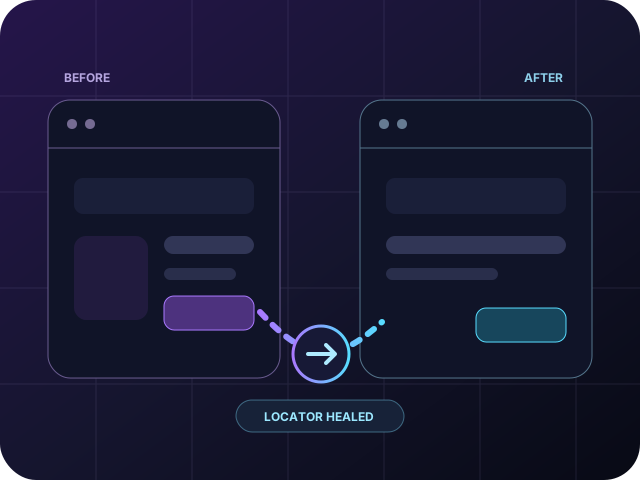 UI changed
Locator healed
UI changed
Locator healed
Real signals. Real impact.
UI velocity and brittle automation collide in predictable ways.
Dozens of tests red on a CSS or component rename.
Blast radiusQA updates XPath while frontend ships the next change.
Manual upkeepTeams avoid improving UI because of automation cost.
Velocity taxTests assert on classes designers treat as private.
False couplingIdentify. Understand. Fix.
UI-change failures usually come from selectors and contracts, not from the product being broken.
Deep XPath and nth-child break when hierarchy shifts.
data-testid and accessible names are missing on new components.
Every screen change requires hunting references across the suite.
Modals and embedded views change without notice to automation.
BEST PRACTICES
Resilience is a design choice. Prefer semantic locators, heal drift, and scope tests to behavior.
Roles, labels, and agreed test IDs survive visual refactors.
Include QA in design reviews for new screens and components.
Let tools propose selector updates after DOM diffs.
If the user outcome is unchanged, the test should still pass.
Built for UI change. Protected by QAlity.
After a redesign, the biggest wins are automatic locator repair on runs and fast re-capture of flows that truly changed, not re-listing every platform capability.
The problem
Mass failures after a redesign-broken XPath and CSS selectors everywhere
How QAlity fixes it
When elements move, rename, or get restructured, Auto-Heal finds the updated match in the live DOM and applies a corrected selector. You review what changed instead of rewriting every test from scratch.
How Auto-Heal worksThe problem
Teams re-record entire suites when only a few screens actually changed
How QAlity fixes it
Use the no-code recorder on updated screens to refresh interactions in minutes. Coverage catches up flow by flow, not through a full-suite rewrite because the header component moved.
See the recorderRelated reading
Keep exploring related problem guides and platform comparisons for the same quality challenges.
 Questions, answered
Quick answers to the most common questions teams have before getting started with QAlity.
DOM structure, labels, and layout shifts break XPath and CSS selectors tied to old markup, even when product behavior is correct.
Prefer stable roles and labels, avoid layout-dependent XPath, and use healing or recorder tools for high-churn screens.
Re-record only flows the redesign touched. Auto-Heal may recover many steps automatically; focus human time on truly changed journeys.
Visual editing and re-recording let QA update flows in minutes without searching every test file that referenced a moved component.
QAlity Auto-Heal corrects locators during runs and the recorder refreshes interactions on updated screens quickly.
Utility-class-heavy UIs change often. Prefer accessible names, data-test hooks, or healing strategies when classes churn every sprint.
For critical revenue or auth flows, stable test hooks reduce maintenance, but pair them with user-visible labels QA can still understand.
Record, run in the cloud, and recover from UI changes with less manual work.








 BEST PRACTICES