Failures with no reproducible steps
Logs show different errors on retry - timeout, assertion, or element not found.
Non-reproDiagnosis field guide
When UI automation keeps failing without a clear owner, teams lose days to triage. This guide maps symptoms to causes and how QAlity step-level screenshots and cloud runs help QA diagnose faster.
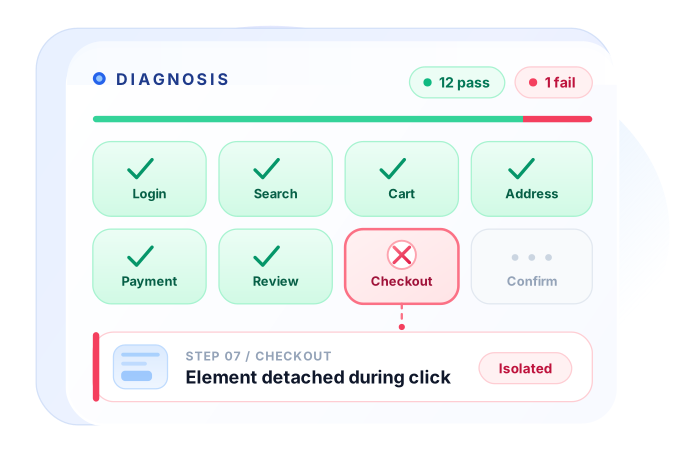 12 of 13 passed
Cause isolated
12 of 13 passed
Cause isolated
Real signals. Real impact.
Failures without a clear owner stall the whole team.
Logs show different errors on retry - timeout, assertion, or element not found.
Non-reproEnvironment, data, or browser differences hide the real failure mode.
Env driftEngineers spend hours watching recordings instead of shipping.
Slow triageTeams delete cases that are too painful to debug.
Coverage lossIdentify. Understand. Fix.
Most “random” failures map to data, infrastructure, assertions, or missing evidence.
Shared accounts, stale records, or time-dependent data make outcomes unpredictable.
Headless vs headed, screen size, network throttling, and agent load change timing.
Checking full page HTML or pixel-perfect layout creates noise on minor UI shifts.
Without screenshots, network logs, and step context, root cause stays guesswork.
BEST PRACTICES
Diagnosis is a design choice. Follow these practices to turn red builds into actionable signal.
Match browser, resolution, and grid settings before deep debugging.
Seed or create entities at test start; never assume prior run state.
Assert labels, URLs, and business state - not implementation markup.
Step-level logs, screenshots, and history turn intermittent mysteries into patterns.
Built for diagnosis. Delivered by QAlity.
When failures feel random, the first priority is evidence: which step failed, what the browser showed, and whether the environment was consistent. That evidence matters more than another feature on the list.
The problem
Red suites with no clear signal. Is it data, UI, infrastructure, or a bad assertion?
How QAlity fixes it
Each run stores per-step pass/fail, logs, and screenshots in one timeline. You open the failing step and see the actual screen state instead of interpreting a generic timeout from CI logs.
Execution history & reportsThe problem
Failures look different on staging versus production and you cannot tell which environment was wrong
How QAlity fixes it
Runs are tied to dev, staging, or production context. When a check fails, you compare history for that environment, not a mix of URLs and data from whoever ran it last.
Multiple environmentsRelated reading
Keep exploring related problem guides and platform comparisons for the same quality challenges.
 Questions, answered
Quick answers to the most common questions teams have before getting started with QAlity.
Failures often mix product regressions with bad test data, environment drift, timing issues, and assertions that no longer match the UI.
Capture screenshots at the failing step, compare staging versus production runs, and isolate whether the same build passes on a clean environment.
Yes. Visual step lists and per-step artifacts help non-developers see what the browser showed instead of parsing WebDriver logs alone.
QAlity execution reports show which step failed, logs, and screenshots in one timeline tied to the environment that ran.
Retries hide flakiness temporarily. Use them only while investigating; fix root causes or quarantine noisy tests instead of masking instability.
When the same step fails consistently across environments with isolated data and stable infrastructure, especially after a recent deploy.
Yes. QAlity supports multiple environments so teams compare staging and production signals without mixing URLs and data.
Record, run in the cloud, and recover from UI changes with less manual work.






 BEST PRACTICES